Salesforce to Postgres Two-Way Sync
A complete guide to syncing Salesforce and PostgreSQL: every method compared (native CDC, Data Loader, Heroku Connect, MuleSoft, ETL, Python, and real-time platforms), a tool-by-tool breakdown, and how to set up true two-way sync in minutes — no code.
- Author
- Ruben Burdin · Founder & CEO
- Published
- June 25, 2026
- Read time
- 9 min read

What is Salesforce to Postgres two-way sync?
Salesforce to Postgres two-way sync is a real-time, bidirectional integration that keeps a Salesforce org and a PostgreSQL database consistent: when a record is created, updated, or deleted in either system, the change is mirrored in the other within seconds. It differs from a one-way export or nightly ETL load, where data flows in a single direction on a schedule and quickly drifts out of date.
Stacksync delivers this sync as a managed, no-code service that is purpose-built for Salesforce–Postgres synchronization. Its two-way sync keeps Salesforce and any PostgreSQL database aligned in real time, mirroring contacts, accounts, opportunities, and all standard and custom objects in both directions — a drop-in replacement for Heroku Connect, with no code and no Heroku lock-in. See the Salesforce and Postgres integration for a one-click overview. This guide explains every way to sync Salesforce and Postgres, compares the main tools, and shows how to set it up step by step.
Key takeaways
- Stacksync delivers real-time, two-way sync between Salesforce and any PostgreSQL database with sub-second latency.
- It works with any Postgres host — AWS RDS, Aurora, Google Cloud SQL, Azure, Supabase, Neon, or on-premises — not just Heroku Postgres.
- Setup is no-code: connect, map objects to tables, choose sync direction, and go live in hours.
- All standard and custom Salesforce objects are supported, with configurable conflict resolution.
- Public pricing starts at $1,000/month, billed per synced record; teams leaving Heroku Connect typically cut costs 30–50%.
- Best for scale: if you're syncing millions of Salesforce records or running production apps on Postgres, Stacksync is the strongest option — it scales from thousands to millions of synced records without performance degradation.
Methods to sync Salesforce and Postgres
There are several ways to move data between Salesforce and PostgreSQL: native Salesforce CDC or the Streaming API with a custom listener, Bulk API v2 / Data Loader batch exports, a DIY Python pipeline, Heroku Connect, batch ETL tools (Fivetran, Airbyte, RudderStack), MuleSoft Anypoint, and a real-time two-way platform like Stacksync. Only the last delivers no-code, sub-second, bidirectional sync to any Postgres host. They differ on direction, latency, engineering effort, and whether they lock you to a specific Postgres host.
| Method | Direction | Latency | Real-time | Code required | Postgres host | Conflict handling |
|---|---|---|---|---|---|---|
| Salesforce CDC / Streaming API + listener | One-way (SF→PG) | Near real-time | Partial | Yes — build & maintain | Any | DIY |
| Bulk API v2 / Data Loader exports | One-way batch | Hours (scheduled) | No | Manual / scripted | Any | None |
| Python / dlt / simple_salesforce (DIY) | One-way (SF→PG) | Varies | No | Yes — build & maintain | Any | DIY |
| Heroku Connect | Two-way | Near real-time | Partial | Low | Heroku Postgres only | Basic |
| Batch ETL (Fivetran, Airbyte, RudderStack) | One-way (SF→warehouse) | Minutes–hours | No | Low | Any | None |
| MuleSoft Anypoint | Two-way | Near real-time | Partial | High | Any | Custom |
| Stacksync | Two-way | Sub-second | Yes | No-code | Any host | Configurable |
Ways to sync Salesforce and PostgreSQL, compared.
If you only need analytics, a one-way ETL load into a warehouse is fine. But if Postgres-backed applications need to write back to Salesforce — or operational data must match in both places — you need real-time two-way sync.
Stacksync vs Heroku Connect vs other sync tools
Among Salesforce–Postgres sync tools, only Stacksync combines sub-second two-way sync with support for any Postgres host and public pricing. Here is how the main options — Heroku Connect, Skyvia, DBSync, and native Salesforce tooling — compare.
| Capability | Stacksync | Heroku Connect | Skyvia | DBSync | Native CDC / Data Loader |
|---|---|---|---|---|---|
| Real-time two-way sync | Yes — sub-second | Two-way, near real-time | Batch, one/two-way | Batch, two-way | DIY / one-way |
| Any Postgres host | Yes (RDS, Aurora, Cloud SQL, Azure, Supabase, Neon) | Heroku Postgres only | Any | Any | Any |
| No-code setup | Yes — hours | Moderate | Yes | Moderate | No — engineering |
| Pricing | Public, from $1,000/mo per synced record | Contract + mandatory Heroku Postgres & Dynos | Per-load tiers | Quote | Infra + engineering time |
| Conflict resolution | Last-write-wins / source-priority / custom | Basic | Limited | Limited | DIY |
| Connectors beyond SF/PG | 200+ | Salesforce↔Postgres only | Many | Many | None |
| Compliance | SOC 2 Type II, ISO 27001, HIPAA BAA, GDPR, CCPA | Salesforce/Heroku platform | Varies | Varies | Your responsibility |
| Best for | Real-time operational two-way sync on any Postgres | All-Heroku stacks | Low-cost batch loads | Scheduled DB replication | One-off / custom pipelines |
Stacksync vs Heroku Connect, Skyvia, DBSync, and native Salesforce tooling.
Skyvia, CData, and DBSync are lower-cost, batch-oriented tools — a good fit for periodic data loads, but they don't provide sub-second, operational two-way sync. Whalesync targets app databases but isn't purpose-built for enterprise Salesforce orgs. Native Salesforce tooling (CDC, the Streaming API, Bulk API v2, and Data Loader) gives you the raw building blocks, but you operate the pipeline, the write-back path, and conflict handling yourself. Stacksync's differentiator is sub-second, CDC-driven two-way sync — a real-time Salesforce–Postgres connector built for production apps that write back to Salesforce. See the full Heroku Connect alternative breakdown for a deeper cost and architecture comparison.
How to connect Salesforce to Postgres (two-way sync setup)
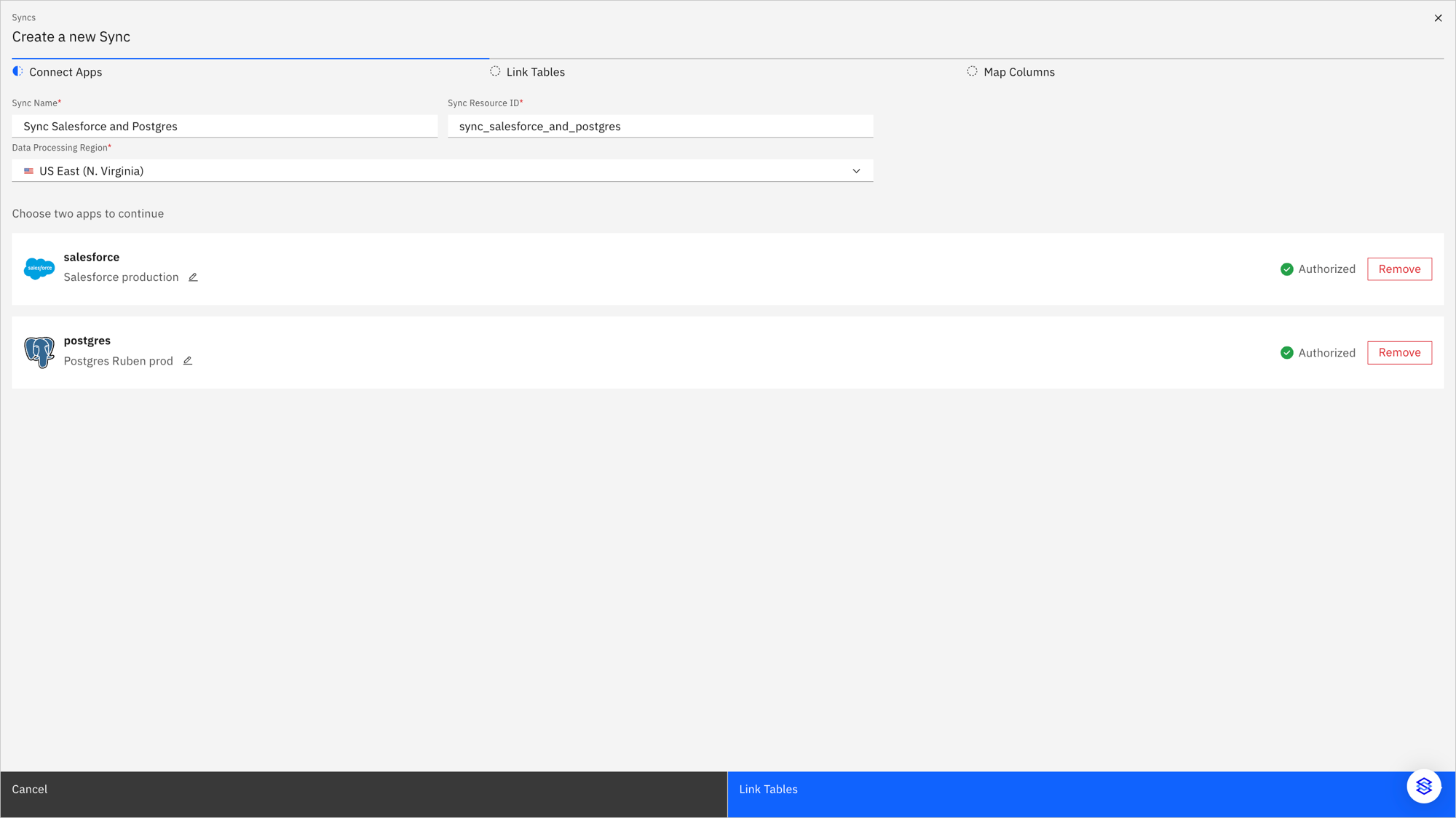
Setting up a real-time, two-way sync to connect Salesforce to Postgres takes a few minutes and no code. In Stacksync, you start by authorizing both apps — your Salesforce org and any PostgreSQL database — in the Connect Apps step:
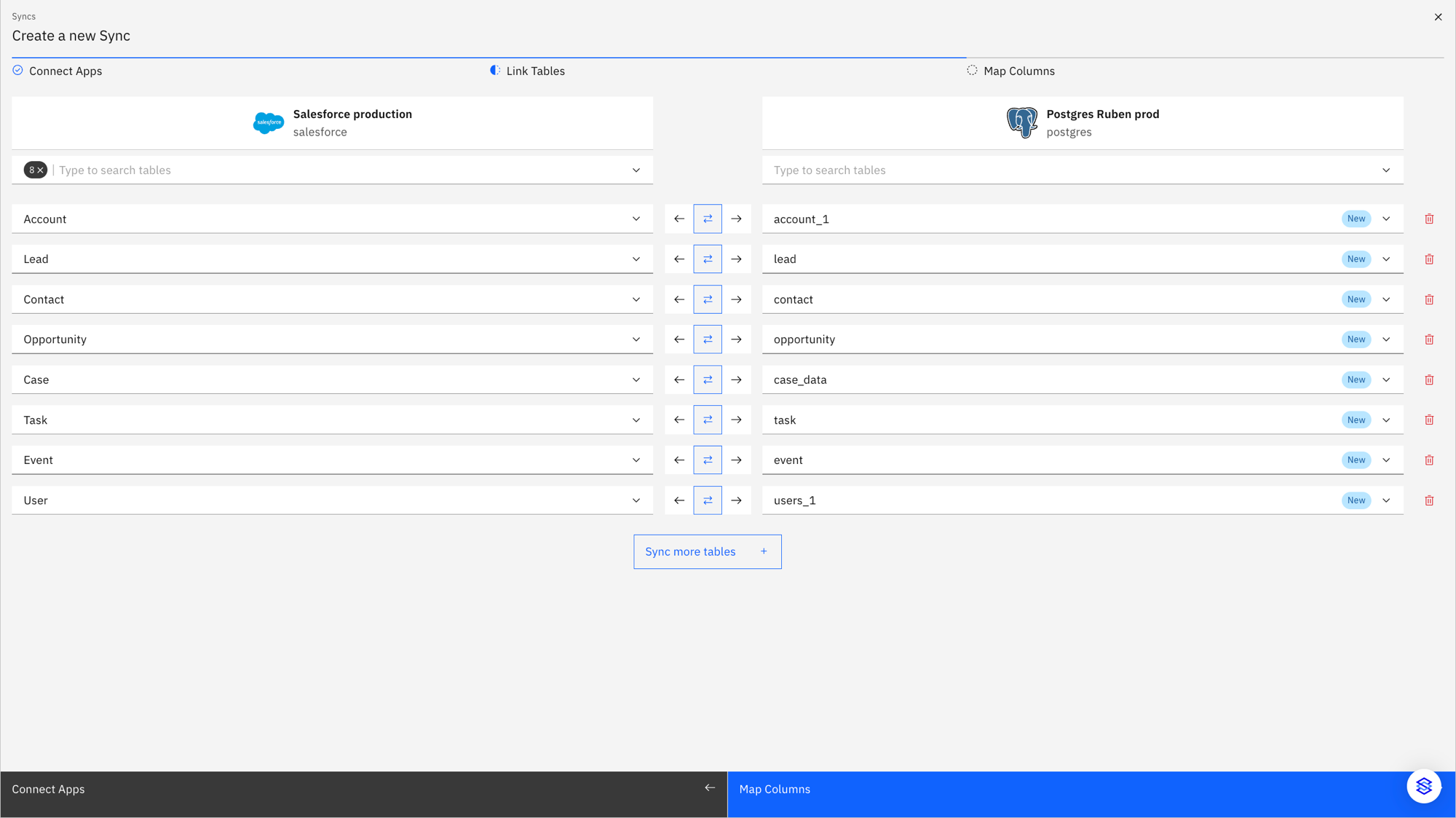
Next, in the Link Tables step you map Salesforce objects (Account, Lead, Contact, Opportunity, Case, Task, Event, User, and any custom objects) to Postgres tables and pick the sync direction per object — left, right, or two-way:
Here is the full process:
- 01Connect SalesforceAuthenticate your Salesforce org with OAuth. Stacksync reads your schema, including all standard and custom objects.
- 02Connect your Postgres databaseAdd your PostgreSQL connection — any host (RDS, Aurora, Cloud SQL, Azure, Supabase, Neon, or self-managed). For databases behind a firewall, use SSH tunneling or VPC peering.
- 03Link tables and map fieldsChoose which Salesforce objects map to which Postgres tables. Stacksync auto-matches fields and data types, handling picklists, lookups, and relationships, and can create tables for you.
- 04Choose one-way or two-way syncPick the direction per object: Salesforce→Postgres, Postgres→Salesforce, or full bidirectional.
- 05Set conflict resolutionDecide what wins when a record changes on both sides at once: last-write-wins, source-priority, or custom rules.
- 06Go live and monitorTurn on the sync. Stacksync runs the initial backfill (full refresh), then keeps both systems aligned with incremental, real-time sync, with dashboards for status, throughput, and errors.
Because changes are captured with Change Data Capture rather than polling the Bulk API v2 or Streaming API on a schedule, the sync stays current without scheduled jobs — and you avoid Salesforce API governor limits. You can also apply row-level and field-level filters to sync only the records and columns you need.
Real-time, bidirectional sync (CRUD both ways)
Stacksync syncs full CRUD operations — create, read, update, and delete — in both directions between Salesforce and Postgres in real time. Under the hood it uses Change Data Capture and logical replication on the Postgres side and webhooks/streaming on the Salesforce side to propagate changes in sub-second time, often in milliseconds. Applications built on standard stacks like Rails, Node.js, and Python connect directly to Postgres and, through Stacksync, stay linked to Salesforce by writing plain SQL. You can also build no-code internal tools on Retool, Appsmith, or Softr without touching the Salesforce API.
Sub-second latency, field-level change capture, and configurable conflict resolution mean both databases reflect the same truth — not a snapshot from the last batch run. Stacksync handles over a billion transactions a day across customer workloads, including high-traffic consumer apps. Learn more about the model in our guide to two-way sync.
Common Salesforce–Postgres sync pitfalls
Most Salesforce–Postgres sync problems come from the same handful of edge cases. Plan for these before you go live:
- Salesforce API limits: batch tools burn through daily API and governor limits; real-time CDC sidesteps them by capturing changes instead of polling. (See Salesforce API limits.)
- Deletes and soft-deletes: decide whether a delete in one system removes or archives the record in the other.
- Field and data-type mapping: picklists, lookups/relationships, and formula fields need explicit handling.
- Initial backfill: large objects need a full historical load before real-time sync takes over.
- Conflict resolution: define which side wins when the same record changes in both systems at once.
Migrating off Heroku Connect
Heroku Connect is the tool most teams start with for Salesforce–Postgres sync, but momentum has shifted. In 2025, Salesforce wound down Heroku enterprise sales for new customers, and the product's opaque, contract-based pricing, mandatory Heroku Postgres and Dynos, row and mapping limits, and Heroku-only hosting push growing teams to look elsewhere. (Note: Heroku Connect — which maps Salesforce objects to Postgres tables via external IDs — is distinct from Salesforce Connect, which exposes external data as OData-backed external objects rather than syncing it into Postgres.)
Migration is low-risk because you can run both systems in parallel: Stacksync replicates your existing sync configuration and mappings, backfills historical data, and establishes real-time sync before you decommission Heroku Connect — so there's no data loss or downtime. Organizations typically realize 30–50% cost savings after switching, mainly by dropping mandatory Heroku infrastructure and moving to transparent per-record pricing.
See the full migration and cost breakdown in our Heroku Connect alternative guide, or check your Migration Fund eligibility.

Security and compliance
Stacksync maintains SOC 2 Type II, ISO 27001, HIPAA BAA, GDPR, and CCPA compliance for Salesforce–Postgres sync. Data in transit is encrypted with TLS 1.2+, with encryption at rest for sensitive workloads, plus role-based access control (RBAC), MFA, SSO, and comprehensive audit logs.
Stacksync Shield lets you share Protected Health Information (PHI) and Personally Identifiable Information (PII) between Postgres and Salesforce inside a high-compliance environment — extending CRM data to production apps in finance, healthcare, and life sciences while meeting HIPAA requirements.
What you can build on a Salesforce–Postgres sync
Once Salesforce data lives in Postgres and stays in sync, you can build customer-facing apps and internal tools directly on the database — customer portals, billing and revenue reconciliation, and internal CS or ops tooling on Retool or Appsmith — with product, account, and customer data unified. Trigger event-driven workflows on data changes, power analytics, or run high-volume consumer apps. Stacksync also syncs Salesforce with HubSpot, Snowflake, Google BigQuery, MongoDB, Zoho CRM, Databricks, and 1,000+ other systems from the same platform.
Getting started
You can get started for free in minutes at stacksync.com. Explore the Stacksync two-way sync product, the Salesforce and Postgres integration, or the individual Salesforce and PostgreSQL connectors. To learn more, see the public documentation or get in touch.
FAQ
Frequently asked questions








Related articles